
How do you choose a dive centre platform? A checklist and a demo script
Most software demos are a tour of the vendor's best screens. That tells you very little about whether the system will survive your busiest Saturday. The fix is to run the demo yourself: decide what matters before you talk to anyone, then hand every vendor the same script and watch where they stall. This guide gives you the checklist, the script, the red flags and a fair way to compare prices. For the features themselves, see what to look for in dive centre management software.
The short answer
Write down how your centre actually runs, then give every vendor the same demo script: a late-night WhatsApp enquiry, an online booking with a deposit, tomorrow's boats, a walk-in buying kit, a cancellation and a refund, and a full data export. Choose the platform that shows each step live, not on slides.
 (opens full size in a new tab)
The short version
- Map your own week first: channels, boats, courses, shop, staff pay and the countries you sell to.
- Give every vendor the same nine-step demo script and score them on what they show live.
- Walk away from slides instead of software, features that are always coming soon, and data you cannot export.
- Compare the total cost: subscription, card fees, add-ons, hardware and any fee added to your customers' payments.
- Run a short pilot on real bookings before you switch the whole centre.
What should you decide before you book any demos?
Decide how your centre actually works, in writing, before a salesperson shapes the conversation. One page is enough. List where enquiries arrive and roughly how many, how many boats and sites you run, the split between courses and fun dives, whether you have a shop, rentals or servicing, how staff are paid, and which countries your customers come from.
Then split your needs into must-haves and nice-to-haves. A must-have is something you would stop the purchase over, such as WhatsApp replies, a printed boat manifest or commission that works the way your contracts say. Finally, name the people who will use it every day. The receptionist and the lead instructor should see at least one demo, because they will find the gaps an owner misses.
What belongs on your checklist?
Your checklist should test the whole day, not just the booking form. Score each item 0 for missing, 1 for partly or by workaround, and 2 for built in and shown live.
- Answers enquiries on WhatsApp on your own number, with a hand-off to a person
- Online booking with live spaces, deposits and refunds to the same card
- Capacity shared by every channel, so web, phone and walk-in draw from the same spaces
- Builds tomorrow's boats from existing bookings and prints the manifest
- A till for retail, rentals and servicing that sees the diver's bookings
- Commission and payroll worked out from who led which dives
- Real books and an export your accountant accepts
- Medicals, certification checks and expiry warnings
- Your data exportable at any time, and where it is hosted
- How long until you are live, and who does the setup
What demo script should you give every vendor?
Send this script before the call and ask them to show each step in the real product, with you choosing the details. A vendor who cannot do a step live has told you something useful.
Time each step and note who did the work: the software or the person demonstrating it. Steps that need a workaround on demo day will need it every day.
- 1. A diver messages on WhatsApp at 11pm, in German, asking about an Open Water course next week. Show what they get back, and when.
- 2. The diver books online and pays a deposit. Show the space disappear for everyone else.
- 3. A walk-in asks for the last place on the same day. Show what stops it being sold twice.
- 4. Build tomorrow's boats from the bookings you already have, then print the manifest.
- 5. The diver rents a wetsuit, buys a mask and pays their balance. Show it as one bill.
- 6. Another diver cancels. Refund their deposit to their card and show what changes in the books.
- 7. Show one instructor's commission for the week, and how each figure was reached.
- 8. Close the cash drawer and open the profit and loss for the month.
- 9. Export every customer, booking and payment, and show the file.
Which red flags should end a demo?
End the conversation, or at least slow it down, when you see any of these. None is fatal on its own, but each one tends to get worse after you sign.
- Slides or videos where you asked for the live product
- Key features that are always on the roadmap, without a date
- No full export of your customers, bookings and payments
- Your WhatsApp number or customer list tied to the vendor rather than to you
- The software company holding your card payments instead of your own merchant account
- Setup measured in months, or a price that only appears after several calls
How do you compare prices fairly?
Compare the total yearly cost, not the headline monthly price. Add the subscription, any add-ons you will actually need, card processing fees at your real volume, card readers or other hardware, setup or import fees, and any fee the platform adds to your customers' online payments.
Then set it against the time it gives back. If a platform saves your team a few hours of admin each week and stops balances slipping through, that is real money. Ask each vendor where their prices are published, and be wary of a quote that changes depending on how keen you seem.
How should you run a trial before you switch?
Run a short pilot on real work before you move the whole centre. Pick one week and one stream, for example fun-dive bookings for one boat, import your customer list, and let the receptionist and one instructor use it alongside your current method.
Agree in advance what success looks like: how quickly enquiries were answered, how long tomorrow's plan took to build, and whether the day's takings matched without anyone fixing them by hand. Check what happens to your data if you stop, too. Under GDPR a diver can ask for their records, and the same principle should apply to your whole business.
How does DiveOps handle the demo script?
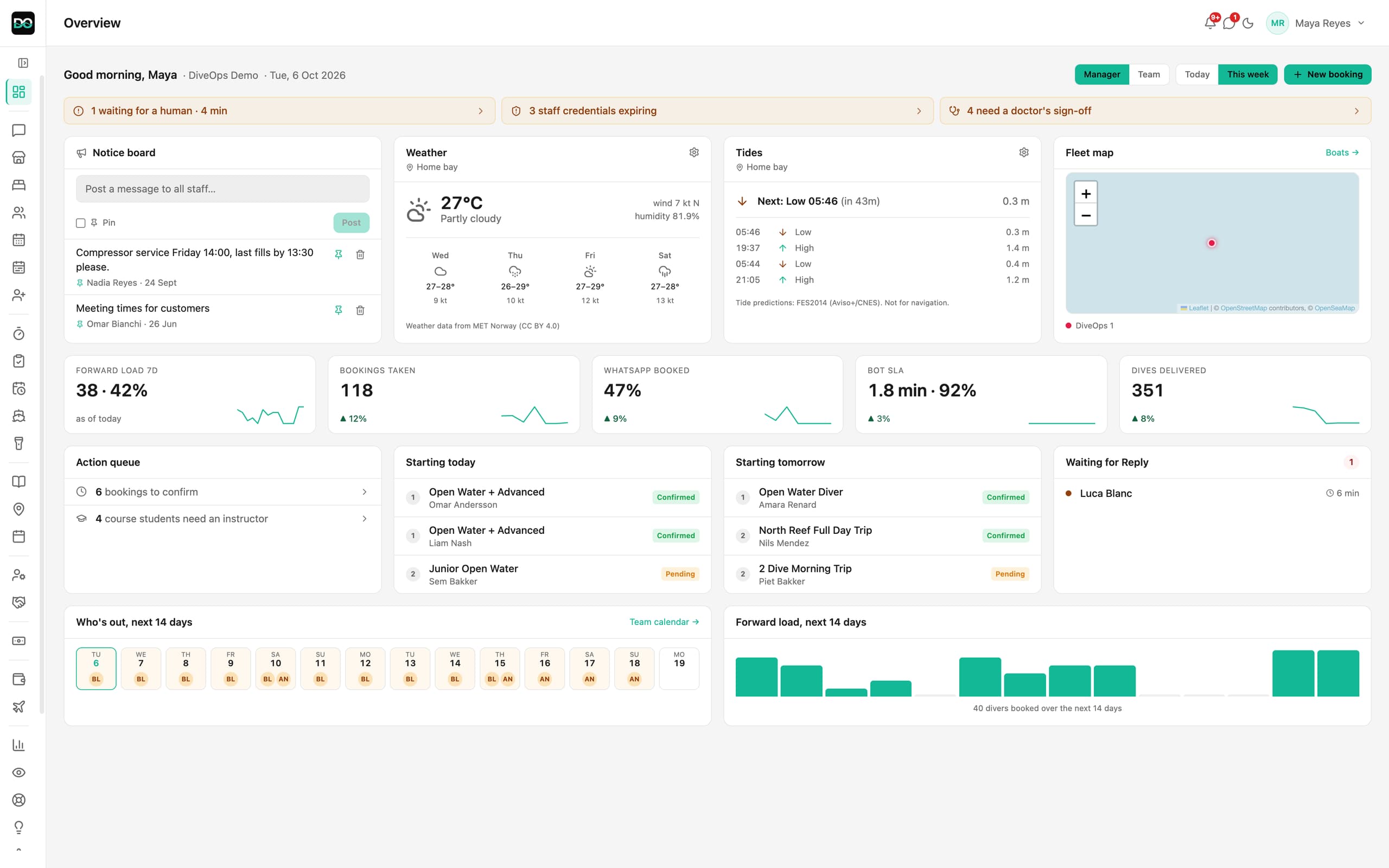
DiveOps runs a live demo on your schedule, using the real product with example data, and you can watch the WhatsApp assistant answer a real message on your own number. It answers 24/7 in the diver's language, in under 2 minutes, and sends your booking link; a person takes over in one tap when needed.
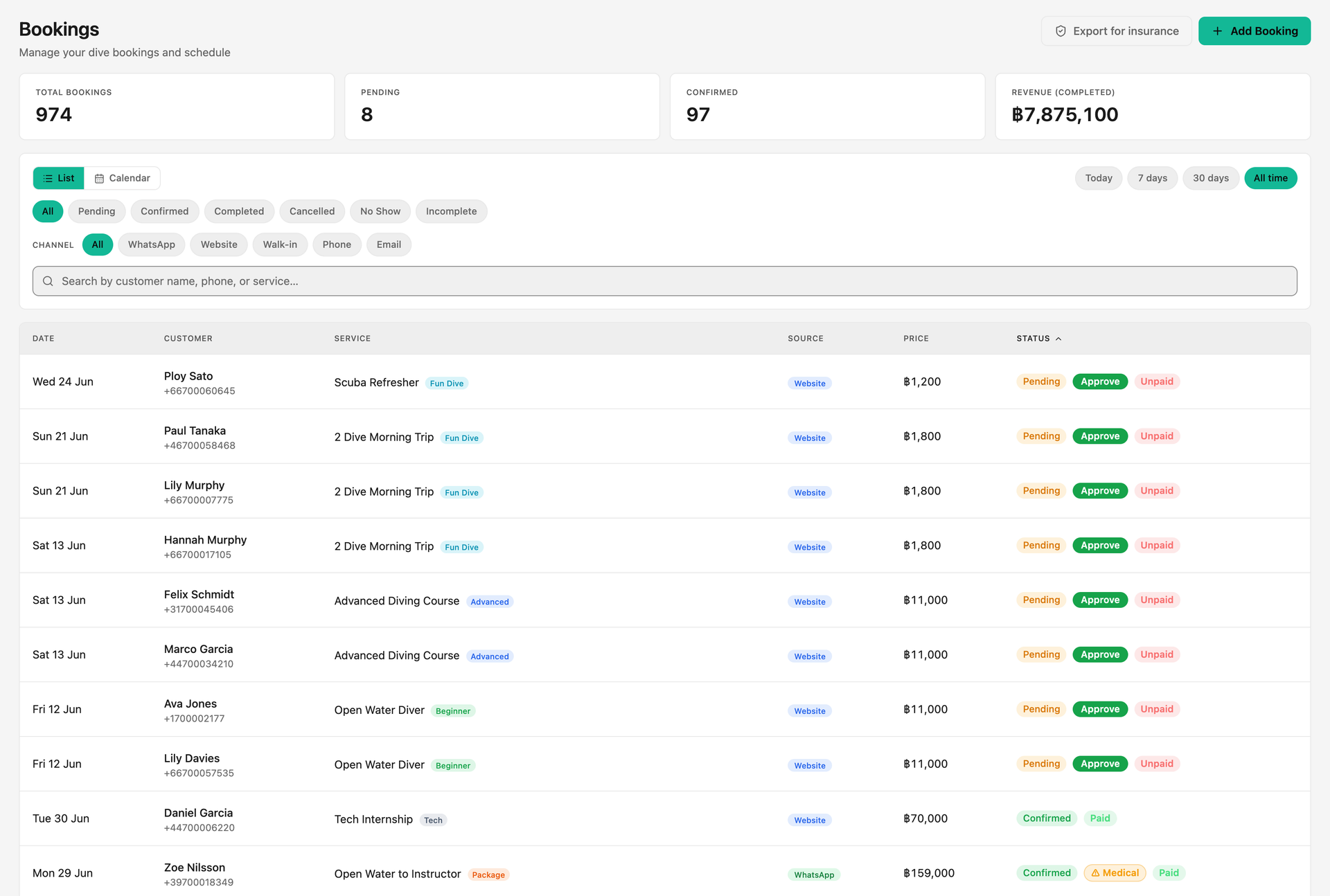
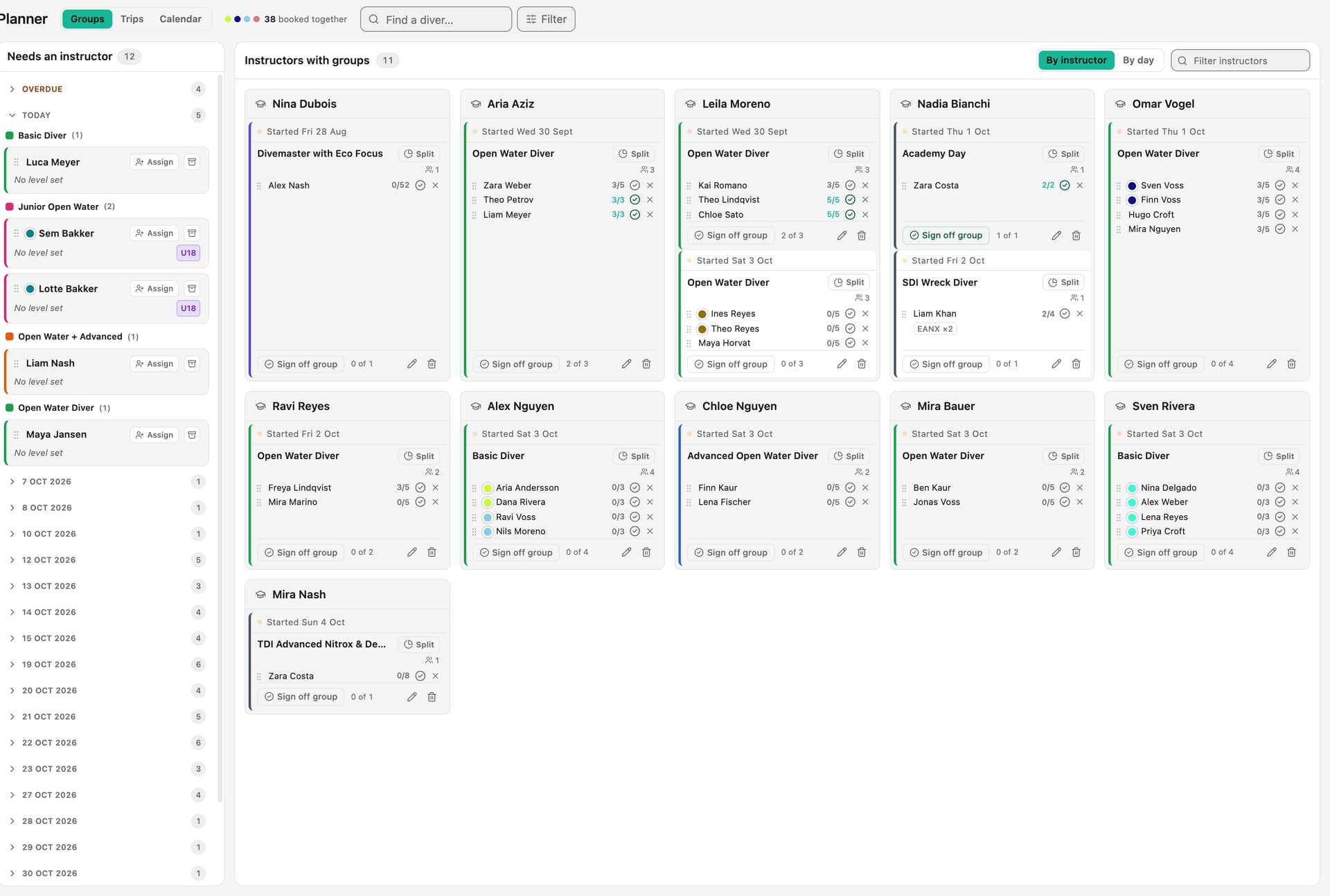
Each step of the script maps to a part of the product: the booking page re-checks capacity at the moment of booking, the trip sheet builds the day from your groups and prints the boat sheet, the till puts a booking and a shop tab on one payment, refunds go back to the card and reverse in the books, commission shows its working line by line, and the cash drawer and profit and loss come from the same payments. Your data is hosted in the EU and exportable. Prices are published on our pricing page.
Questions, answered.
How many dive centre platforms should I demo?
Two or three is usually enough. Shortlist from your must-haves first, then run the same script with each so you compare like with like.
Who from my team should join the demo?
The owner, the person who runs reception and a lead instructor. The people who use it every day spot the gaps that matter on a busy morning.
What is the most important thing to test?
Whether one booking flows through without being retyped: from enquiry to boat to till to the books. That is where most time and money is lost.
Should I worry about getting my data out later?
Yes. Ask for a full export during the demo, not after you sign. Your customers, bookings and payments should stay yours if you ever leave.
See it run your dive centre.
A short live walkthrough on your real schedule. No slides, no sales patter.