
What features should you look for in dive centre management software?
Most dive centre software was built for the booking desk, not the busy season. This checklist is for owners comparing options: the features that matter, the questions that separate an operations platform from a calendar, and how to judge any tool, including DiveOps, against the way your centre really runs.
The short answer
Look for software that runs the whole day from one set of records: enquiries answered on your own WhatsApp number, online bookings with deposits, dive groups and sign-off, a trip sheet with boat capacity, gear and rentals, a shop till, staff pay with commission, and finance. Then check setup, pricing and data export.
 (opens full size in a new tab)
The short version
- Start with where enquiries arrive: for many centres that is WhatsApp, often out of hours and in another language.
- A booking should flow through to the dive group, the boat and staff pay without anyone retyping it.
- The trip sheet is the real test: ask every vendor to build tomorrow's boat in front of you.
- Check the money side: a till for gear and rentals, card payments to your own account, and commission worked out for you.
- Ask who sets it up, how it is priced, and whether you can export your data at any time.
What features should you look for in dive centre management software?
Look for features that cover the whole day, sharing one set of records so nothing is typed twice. Use this checklist when you score any platform.
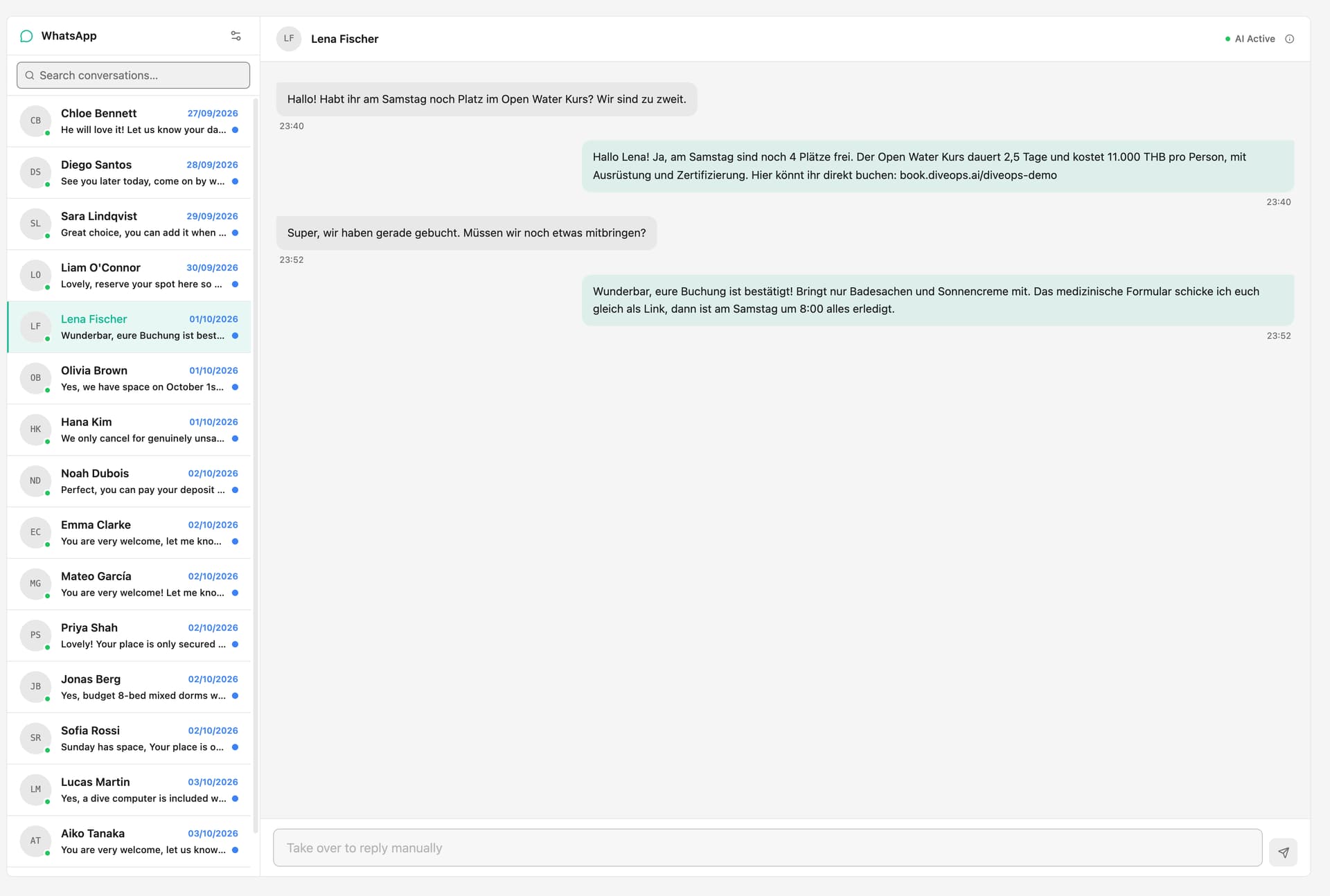
- Enquiries: replies on your own WhatsApp number when nobody is at the desk, in the diver's language, with a clean hand-off to a person.
- Online bookings and deposits: a booking page on your own website, with card payments to your own account.
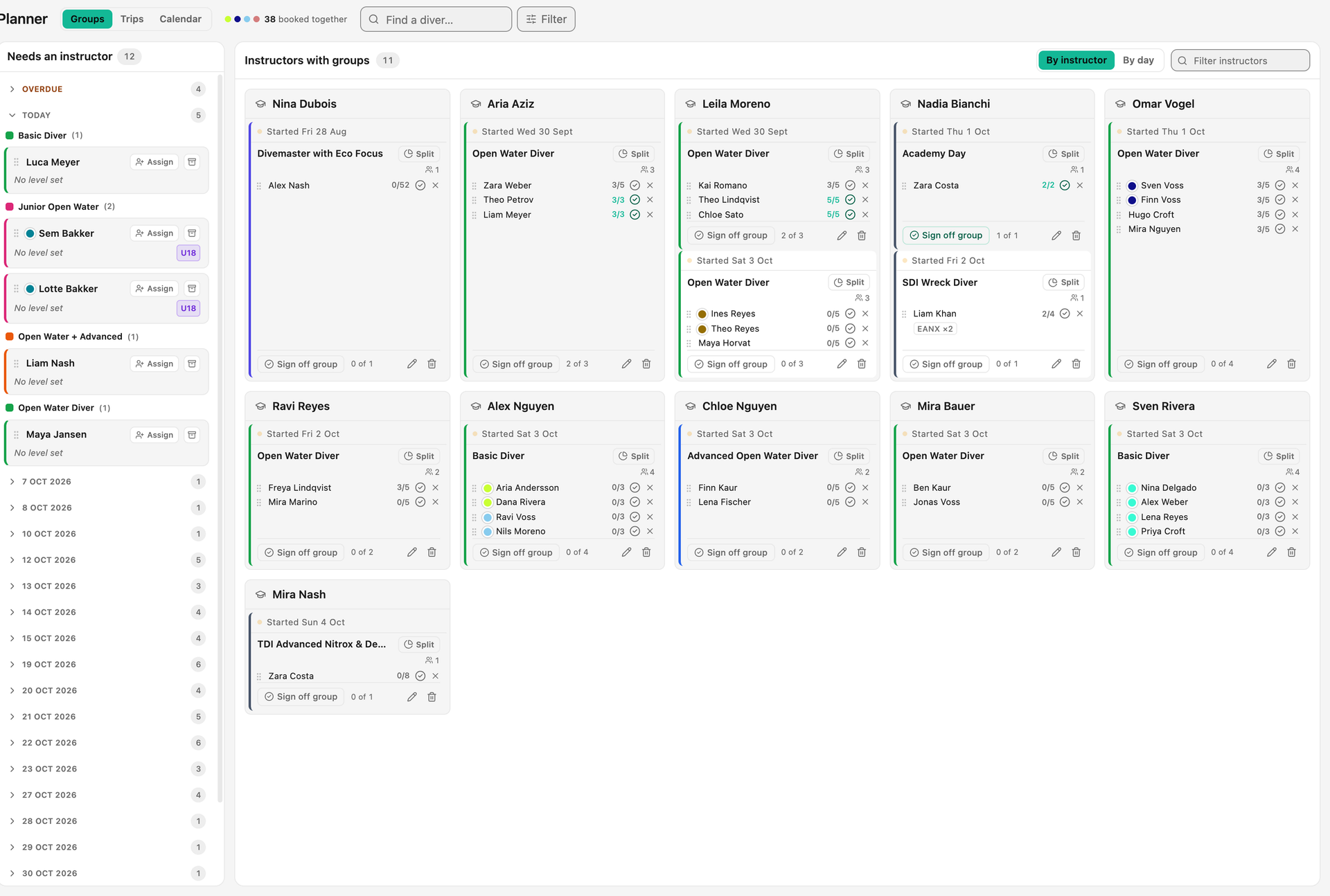
- Dive groups and courses: students grouped under an instructor, progress per diver, and sign-off at the end.
- Trip sheets: groups placed on boats with a live headcount against capacity, and a printout for the boatmaster.
- Dive schedule and sites: a season of dive-site plans the daily sheet builds from.
- Gear and rentals: who has which item, its condition, service intervals and rental pricing.
- Shop till: retail, rentals and servicing on one ticket, with card readers and a cash drawer that balances.
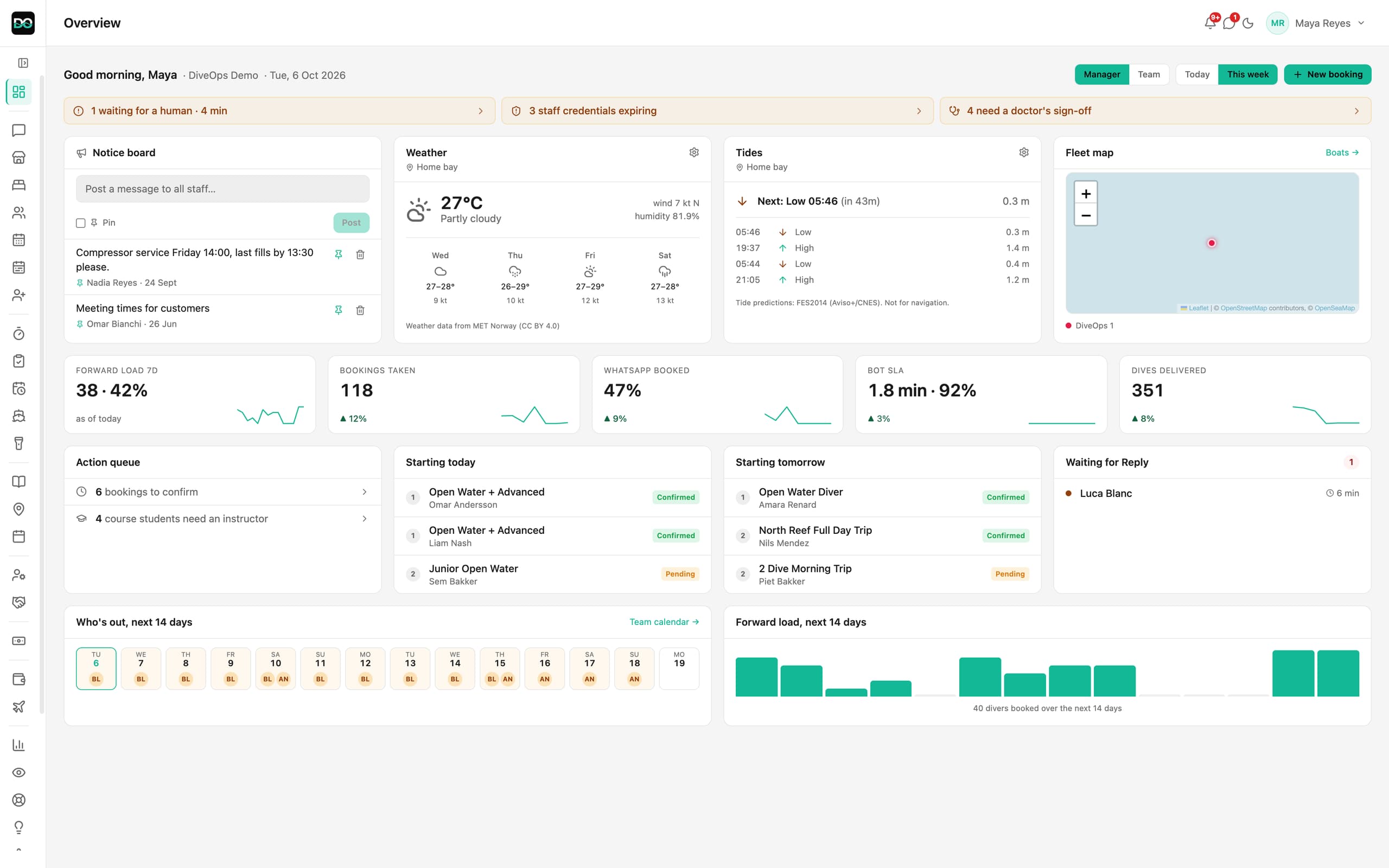
- Staff and pay: access levels, leave, payroll and instructor commission worked out from what actually happened.
- Finance: profit and loss, invoices, expenses and a way to get it to your accountant.
- Safety and compliance: certification and medical checks, and warnings before something expires.
- Setup, pricing and data: who does the setup, what changes the price, and whether you can export everything.
Where do your enquiries actually come from?
Before you compare feature lists, look at your inbox. For many centres the first contact is a message, not a phone call or an email, and a large share lands on WhatsApp, often outside opening hours and not always in English. If the software treats messaging as an afterthought, it is solving yesterday's problem.
DiveOps puts an AI assistant on your centre's own WhatsApp number through the official WhatsApp Business Platform. It answers routine questions 24/7 in the diver's language, in under 2 minutes, and sends your booking link, handling about 92% of routine questions without a person. That is a different category to a contact form that emails you a lead to chase in the morning.
- Does it work on your own number, or a generic shared inbox?
- Does it answer when nobody is at the desk?
- Does it handle the languages your divers write in?
- Can a person take over any chat in one tap?
Does the booking flow through, or stop at the form?
Score the whole path from first message to a seat on the boat. A diver asks a question, gets an answer, picks a date, pays a deposit and lands in the right group, with no member of staff retyping the same details into three screens. Any step that drops back to a manual handover is where your season leaks time.
In DiveOps, bookings from WhatsApp, your website and walk-ins land in one list, join a dive group under their instructor, and reach the trip sheet and finance from there.
Can it build tomorrow's trip sheet?
The trip sheet is the fastest way to expose thin software. A real operations platform knows your dive groups, boats, instructors and the season's schedule, and assembles the day with you. A weak one hands you a blank grid.
In DiveOps the day's boats come from your schedule, you drag groups onto boats while a live headcount checks capacity, and publishing sends each guide their plan and prints a two-page sheet per boat. Ask any vendor to walk through a full day, start to finish, and watch where the gaps appear. Our trip sheet guide covers what a good sheet holds.
Does it handle the money: till, card payments and staff pay?
Check the money side as carefully as the booking side. A dive centre sells gear, rents kit, services regulators and pays instructors commission, and each of those should land in the same books as the bookings.
DiveOps has a shop till for retail, rentals and servicing, Stripe card readers that put each payment on the right booking or sale, and payroll that works instructor commission out from the published trip sheets. Payments go to your own Stripe account, and card fees can be up to 20% lower than the terminal rates many centres pay, never guaranteed.
Does it work alongside your certification agency?
Good operations software works alongside your agency rather than replacing it. Your certification records, e-learning and processing live in the agency's own systems, and that is where they should stay.
DiveOps runs the centre's operations, the bookings, groups, boats and trip sheet, while your SSI, PADI or other agency processes carry on as they are.
Who sets it up, how is it priced, and who owns the data?
Two questions get skipped in demos and cause the most regret later. First, how long until you are genuinely live, and who does the work. Second, who owns the data. Your customer list, booking history and messages are among your most valuable assets, and your customers have rights over their personal data too, including data portability under UK GDPR, so confirm you can export everything.
DiveOps is one plan with every feature, priced by the divers you take each year, with no tiers and no per-seat charges. We set up your services, boats, dive sites and prices with you on a video call. There is no lock-in, and you can export your data as CSV at any time.
Questions, answered.
What features should dive centre management software have?
Replies to enquiries on your own WhatsApp number, online bookings with deposits, dive groups and course sign-off, a trip sheet with boat capacity, gear and rentals, a shop till, staff pay with commission, and finance, all sharing one set of records.
Is generic booking software enough for a dive centre?
Sometimes, if online checkout is the only gap. Most generic tools are not built around dive groups, boats, course sign-off or the trip sheet, so staff end up filling those gaps with spreadsheets.
Does dive centre software replace my SSI or PADI systems?
No. Certifications, e-learning and processing stay in SSI's or PADI's own systems. Operations software such as DiveOps works alongside them and runs the bookings, groups, boats and trip sheet.
How important is data ownership?
Very. Your customer list, booking history and messages are core assets. Before you commit, confirm you can export your data at any time and that it stays yours if you leave.
How quickly should I expect to go live?
Ask each vendor who does the setup and what they need from you. DiveOps sets up your services, boats, dive sites and prices with you on a video call and does the technical setup.
See it run your dive centre.
A short live walkthrough on your real schedule. No slides, no sales patter.