
Dive centre management software: the complete guide
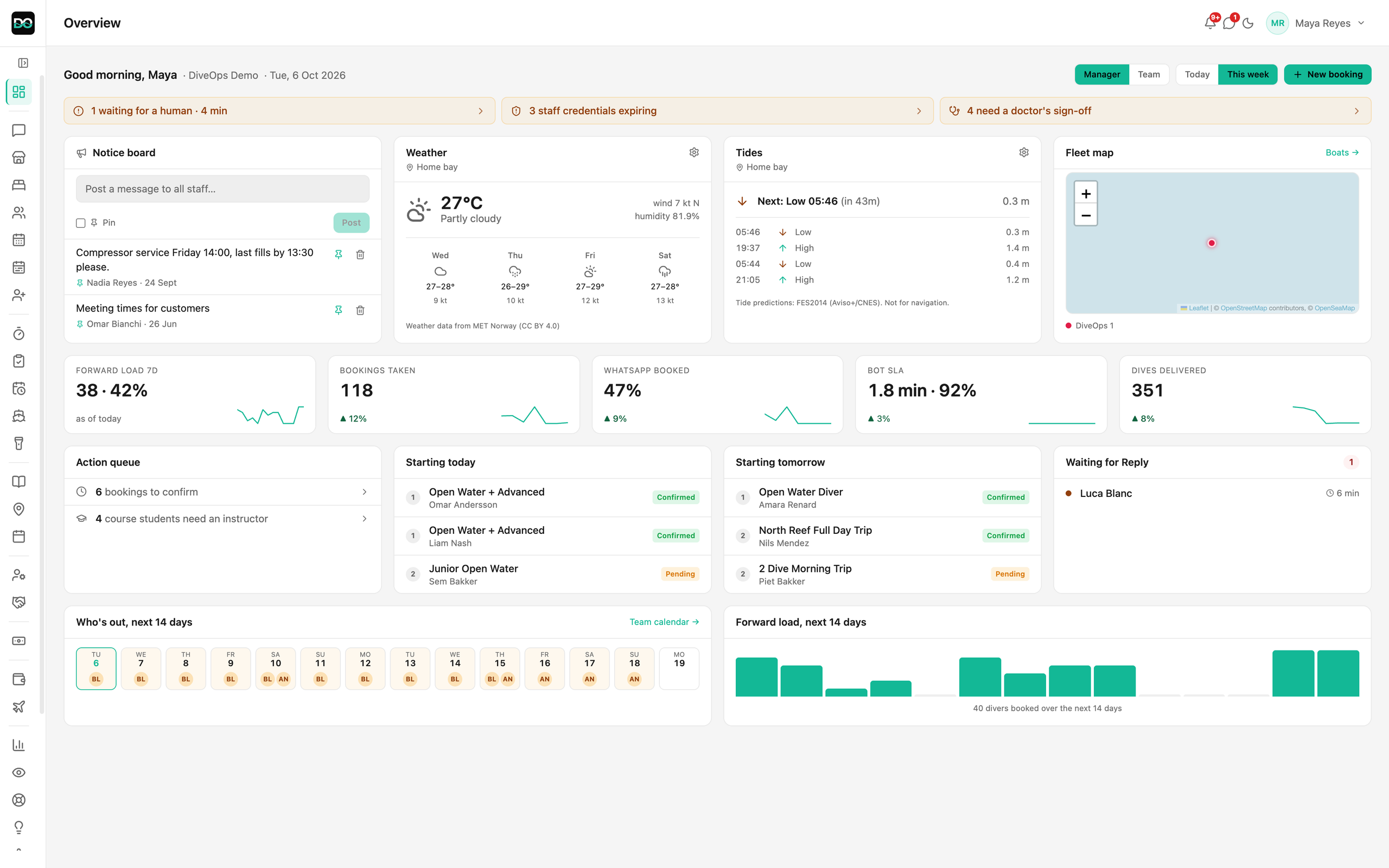
Dive centre management software is the system a dive centre uses to run its operations: enquiries and bookings, the dive day and trip sheet, boats and gear, team, and finance, in one place. This guide explains what the category covers, what to evaluate, the one-system versus point-tools question, and where DiveOps fits among the alternatives.
 (opens full size in a new tab)
The short version
- Dive centre management software runs a centre's operations end to end: comms, bookings, the dive day, boats and gear, team and finance.
- It differs from generic booking tools by understanding boats, gas, courses, instructor ratios and the trip sheet.
- The core choice is one integrated system versus several point tools stitched together; each has real trade-offs.
- Evaluate on comms, bookings, operations, boats and gear, team and finance, plus setup time and data ownership.
- Several credible tools exist; DiveOps is the AI-first, WhatsApp-led option, and a comparison cluster covers the rivals.
What is dive centre management software?
Dive centre management software is a platform that handles the operational jobs of a dive centre in one system, rather than across a booking widget, a spreadsheet and a messaging app. At its fullest it covers communications and enquiries, bookings and payments, the dive day and trip sheet, boats and gear, team and HR, and finance, so the same customer and booking data flows through every job without being re-keyed.
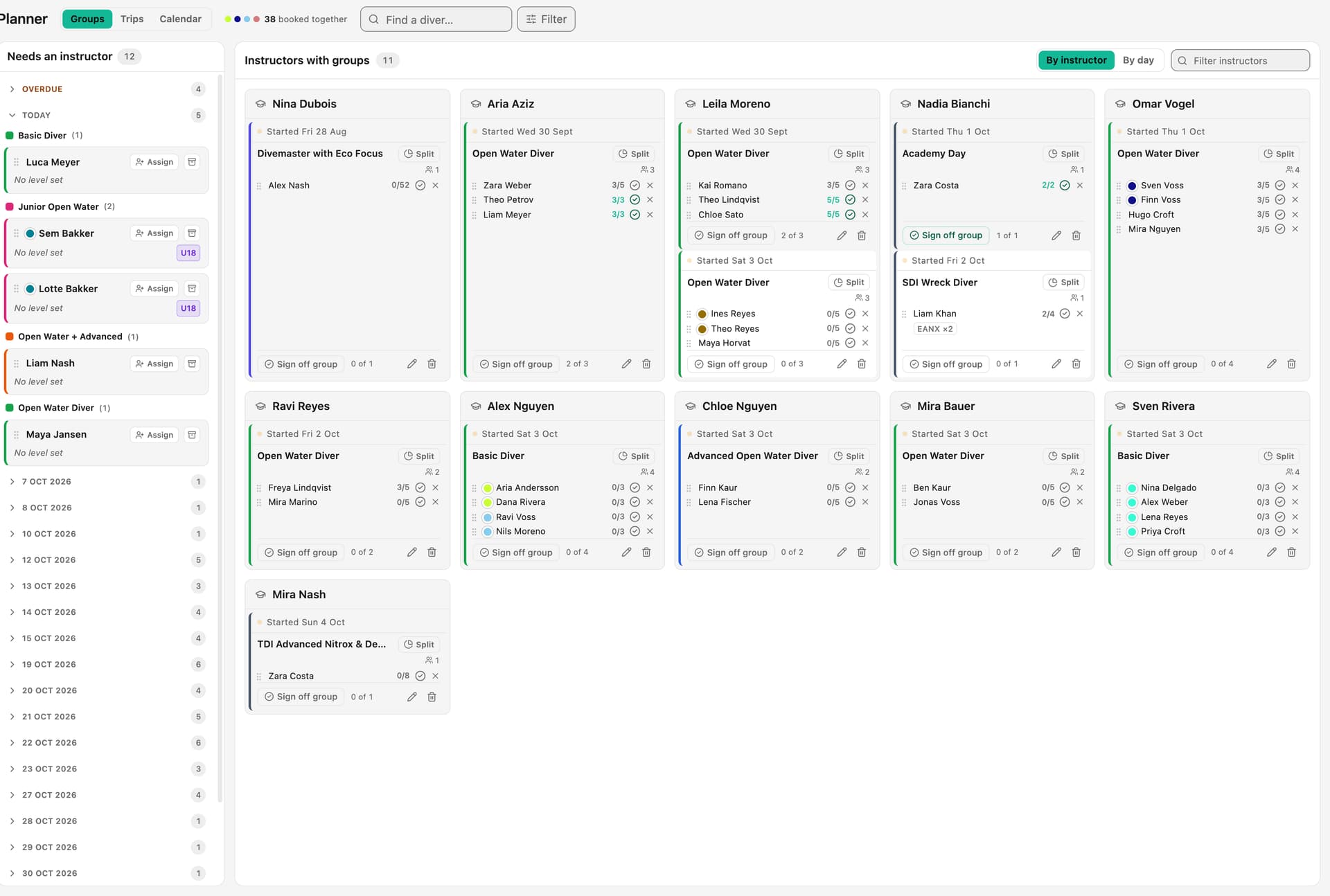
The category exists because a dive centre is not a generic activity business. It runs boats, tracks gas and gear, teaches multi-day certification courses with instructor and divemaster ratios, and rebuilds a trip sheet most mornings. Software that ignores those realities leaves staff patching the gaps by hand, which is where the category earns its keep.
What should dive centre management software do?
Judge any platform against the jobs a centre actually does every day, not a feature list. Six areas matter, and a genuine operations platform covers all of them rather than doing one well and gesturing at the rest.
- Communications: answer enquiries fast, ideally automatically and multilingually on your own WhatsApp number, with a clean handover to a human.
- Bookings and payments: take a booking and a deposit in one flow, with capacity checked so seats cannot be oversold.
- Operations and the trip sheet: who is diving, on what, with which instructor, organised by day and by boat.
- Boats and gear: a live view of the fleet, plus gear and servicing tracked so nothing goes out overdue.
- Team and finance: rosters, payroll with commissions, a point of sale and books that reconcile.
- Setup and data ownership: how fast you go live, and whether your data stays exportable and yours.
One system or several point tools?
The central decision is whether to run one integrated platform or stitch together point tools, a booking widget here, a spreadsheet trip sheet there, WhatsApp on a personal phone, accounting somewhere else. Point tools can each be strong in isolation and let you pick a favourite for every job, which suits a very small or unusual operation.
The cost of point tools is the handovers between them. Every boundary where data is re-typed, the enquiry into the booking, the booking onto the trip sheet, the trip sheet into the books, is where time leaks and errors creep in, and no single tool sees the whole picture to warn you when something is wrong. An integrated system trades some best-of-breed depth for one source of truth and far less re-keying.
There is no universally right answer. A centre with simple needs may be well served by a couple of tools, while a busy multi-boat operation usually gains more from one system. The honest test is to count how many times the same booking is entered on a normal day, and decide whether removing that friction is worth more than picking a specialist tool for each job.
How do you evaluate a platform?
Two questions get skipped in demos and cause the most regret later. First, how long until you are genuinely live and earning back the effort, not just signed up. Software that needs a month of configuration is a cost before it is a tool. Second, who owns the data: your customer list, booking history and messages are among your most valuable assets, so confirm you can export them and that they stay yours if you ever leave.
Beyond those, ask each vendor to walk a full operational day, from the first enquiry to the closed drawer, and watch where the gaps appear. Weak software hands you a blank grid at the trip-sheet stage; a real platform assembles the day from the schedule, groups and bookings you already hold. And be clear on the agency boundary: if you teach SSI or PADI courses, certifications and e-learning stay in the agency's own systems, so good operations software works alongside that workflow rather than trying to replace it.
For a longer criteria-led walkthrough with a seven-point checklist, see how to choose dive centre management software.
Where does DiveOps fit?
Several credible dive centre platforms exist, and the right choice depends on how your centre runs. DiveOps is the AI-first, WhatsApp-led option in the category: it puts a 24/7 AI on your own WhatsApp number through the official Meta Business API, answering divers in their language and sending the booking link, then keeps bookings, the dive day, boats and gear, team, and finance in one login, so the enquiry and the operation are not two separate systems.
It is built by a former Koh Tao dive professional, was validated with 20 Koh Tao dive centres before launch, and now runs operations for one of the world's largest SSI dive centres. It works alongside SSI, PADI and other dive agencies rather than replacing their certification workflow. Card payments run through your own Stripe account, with card fees up to 20% lower than the terminal rates centres typically pay.
No single tool is right for every centre. If you want to weigh DiveOps against the alternatives feature by feature, see the best dive centre management software comparison, or see the whole platform on the product overview.
Questions, answered.
What is dive centre management software?
It is software that runs a dive centre's operations in one system: communications and enquiries, bookings and payments, the dive day and trip sheet, boats and gear, team and HR, and finance. It differs from generic booking tools by understanding boats, gas, courses, instructor ratios and the daily trip sheet.
Is one integrated system better than separate tools?
It depends on your size. Point tools can be individually strong but leak time at every handover where data is re-typed. An integrated system trades some specialist depth for one source of truth and far less re-keying, which usually pays off for busy multi-boat centres more than for very small operations.
Does dive centre software replace SSI or PADI systems?
No. Certifications, e-learning and processing stay in the agency's own systems, which is where they belong. Good operations software works alongside SSI, PADI and other dive agencies, handling the centre's bookings, groups, boats, trip sheet and finance while the agency admin carries on unchanged.
What should I check before choosing a platform?
How fast you go genuinely live, whether your data stays exportable and yours, and whether the software assembles a full operational day rather than handing you a blank grid. Ask each vendor to walk one whole day, from first enquiry to closed drawer, and watch where the gaps appear.
Sources

See it run your dive centre.
A short live walkthrough on your real schedule. No slides, no sales patter.