
The day on the shop TV, no login needed.
The short answer
DiveOps display boards put today's dive groups and dive schedule on any screen in the shop, with no login. Divers find their instructor and group at a glance, and the board refreshes every two minutes from the same plan your team is working from.
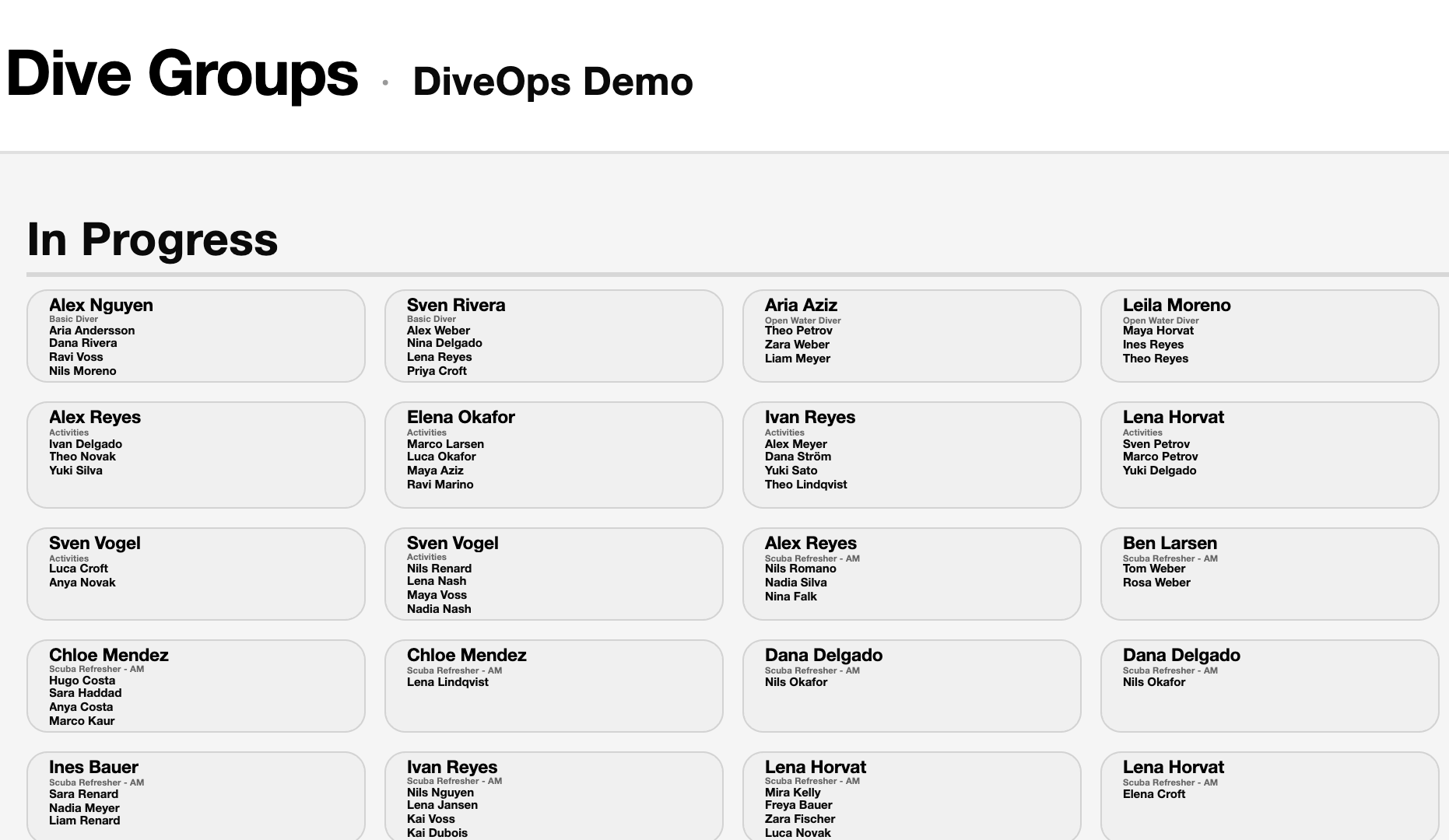
What can the boards show?
Two boards: dive groups, with each instructor, course and diver for today, tomorrow and in progress; and the dive schedule, with the sites for each trip. Choose the theme and orientation to suit your screen.
How do I put it on a TV?
Open Display Boards in Settings, copy the board's private link and open it on any screen with a browser. It needs no login and refreshes on its own every two minutes.
Can it help divers book?
Yes. A board can show a QR code for your booking page or for walk-ins to sign up, so the TV sells the next dive while divers wait.
Questions, answered.
Is the board link safe to leave on a screen?
Each board has its own private link, and it shows only today's groups and names: no prices, contact details or money.
Does it work in portrait?
Yes. Each board has its own orientation and theme.
Do I have to update it?
No. It reads the Planner and the schedule, so it changes when they do.
See it run your dive centre.
A short live walkthrough on your real schedule. No slides, no sales patter.